What Can Client Resource Management Software Track for Teams

Client work creates information across emails, meetings, projects, documents, payments, and daily tasks. As these records grow, teams can lose track of important details across different tools. Teams need a clear way to organize this information without depending on scattered spreadsheets, inboxes, or disconnected notes. The right system brings relevant records together, making client details, conversations, tasks, projects, documents, resources, and account activity easier to access and manage.
A centralized record gives employees useful context before they contact a client, update a project, or complete a follow-up. Client resource management software connects relevant information within organized client records. Instead of searching through multiple systems, teams can review responsibilities, deadlines, previous interactions, and current account activity from one location. Features vary between platforms, but the core purpose remains keeping client information connected, searchable, organized, and accessible to authorized team members.
What Is Client Resource Management Software
Client resource management software is a resource that will help in organizing details related to clients and the work that was executed on behalf of the clients. It can be linked to contact information, projects and tasks, conversations, documents, time, billing and team activity. It’s not just about data storage. Builds connections between records to help employees to see the big picture in an account.
What Information Does It Store
It can store client names, phone numbers, email addresses, company information, job roles, account ownership, notes, documents and previous interactions, among other things, in a typical system. Additionally, teams can add custom fields for data that is relevant to their business or workflow.
A service company, for instance, may track dates of contracts, needs for services, information about service renewals, account priorities, and representatives assigned. This information is kept easily accessible via client software management, instead of being spread out throughout individual files.
Who Uses It
The same client information can be used for multiple teams to be used for various purposes. The sales representative can check the history of contacts and the account manager can track the requests and follow-ups. Project managers can associate accounts with active work, deadlines and employees.
Client records and documents, hours, invoices and project activity can be linked for professional service businesses. This common system allows different areas and departments to access the information needed without the need of each employee having to keep individual records.
What Can Client Resource Management Software Track
Client profile, communications, tasks, projects, documents, team resources, payments and account activity are the main tracking areas. What’s important to differentiate is the relationship between these records. A client interaction may refer to a task which may be part of a project which may refer to documents or billing information.
Client Profiles and Communication
Client profiles include contact information, company details, roles on the account, ownership, preferences and custom fields. The teams can then link emails, calls, meetings, messages, and notes to those profiles.
This will help to establish an interaction history. An employee is able to go back and read through and get a good idea of what is going on before he or she contacts a client. Client tracking software can also track follow-up activities, ensuring that there is continuity in the event that various team members are working with the same client.
Tasks and Daily Activities
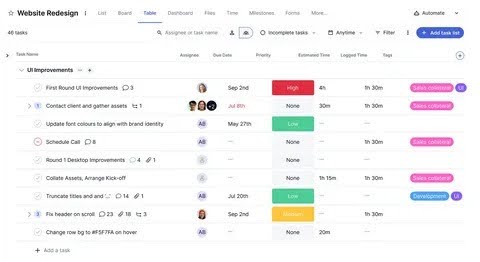
Follow up, document requests, meetings, approvals, calls and project actions are all tasks that can be assigned to the client. An owner, a deadline, and a priority can be defined for each activity, as well as its completion status.
This will help to build accountability between teams. The employees don’t have to memorise what is left to do and who is responsible for each of the tasks. When checking on the status of an account, managers can also see what activities have not been completed.
How Does It Track Client Projects and Resources?
Many times there are multiple people involved with the client’s work who are aiming for different results. Project tracking is used to link those responsibilities to the appropriate client account. This provides a wider overview of progress, capacity, deadlines and work distribution to managers.
Project Status and Team Assignments
Projects can be broken down into stages, milestones, deliverables and deadlines. A team can document planned, performing, waiting, delayed or completed work.
Assignments can be used to indicate who is responsible for certain project areas or assignments. These assignments can be checked by the manager as part of his planning process for new work or to find out if enough resources are available for ongoing projects.
Time, Workload, and Resource Records
Time tracking can be correlated with hours worked on a client, a project or an activity. Workload records are another indicator of the utilisation of working capacity.
For instance, one of your workers can have a number of tasks that are urgent, but another can have available capacity. It can be helpful to have all of this information in one place and help minimize reliance on informal updates.
How Does It Track Client Documents and Records?
Many times client information is embedded in contracts, proposals, agreements, project files and internal notes. These are linked to client accounts to provide a more holistic history of the clients and facilitate easy access to key information.
Client Files and Internal Notes
Contracts, proposals, agreements, forms, attachments and project documents can be associated to specific accounts that belong to the teams. Meeting notes and client requests, decisions, and account updates can be documented in the system’s internal notes.
This will be particularly helpful if an employee transitions to a different role or another team member ends up with an account. The new owner may examine the records and not have to rely solely on oral explanations.
Document History and Access
Access controls determine who will be able to access or modify specific records. Some even offer version history and audit logs.This is important when there are confidential agreements or financial details with clients, or sensitive project details in client records. Before storing any information that is important to their business, it is crucial that teams check the permissions before.
Can It Track Client Payments and Financial Information
There are differences among financial tracking programs. Basic level of invoice and payment visibility in some systems; other systems can be linked to specific accounting applications. Depending on the team, then, it is important to differentiate between client financial tracking and complete accounting.
Invoices and Payment Statuses
A platform can capture invoice numbers, dates, amounts, payment statuses and outstanding balances. Status labels can be used to define paid, pending, overdue or partially paid invoices.
Having the context of an invoice in the records of a client will be helpful for account managers when they speak with clients. They are able to find out which issues with billing have not been resolved without the need to view separate records.
Billing Details and Accounting Connections
Payment terms, billing contacts, recurring charges and account balances can all be stored in billing records. Selected financial information can be synced through integrations with accounting systems.
You can also import transaction information with payment connections. The available data will be dependent on the integration and systems involved, however. Before using financial data that is linked, teams should ensure its synchronization according to the rules.
How Does Client Resource Management Software Track Team Activity
Team activity generates a track record of how staff takes care of the client’s account. The timeline can be used as a way to follow up on assigned activities, to review updates to the account, and to use it as a way to see what happened when managers need operational context for the account.
Assigned Responsibilities and Account Updates
Every task may have an owner, time frame, priority and present standing. Recently, account timelines may also display notes, updates, follow-up actions and interactions with the account.This helps teams to understand what work is being done with clients in real-time. As activities are transferred from employee to employee, the activity history can serve as a helpful reference for the new employee.
Activity Reports and Workload Visibility
Managers have access to reports for the following activities: completed activities, pending tasks, account updates, and workload. These reports can uncover areas of attention that are common for these accounts and areas that still need work done.
Activity information needs to be viewed in conjunction with quality, client outcomes and project complexity. High activity doesn’t always equal good account management.
How Does It Track Client Data Across Different Channels
Client data doesn’t normally come from a single source. Email, calendar, project application, accounting, payment, and scheduling software can be used by businesses. Selected information can be connected to each other across systems through integrations.
Email and Project Tools
Email integrations can tie emails and/or communication activity to client records. You can use calendar connections to pass on meeting information or project integrations to pass tasks, deadlines, files and project statuses.
These connections are not the same depth of engagement for all platforms. Some offer basic synchronization, others have more comprehensive workflow automation.
Accounting and Business Systems
Invoice or payment information can be imported in client records via accounting connections. A scheduling system can supply information such as appointments, or other business applications can feed information, such as customers or business operations.
When set up properly, these can cut back on data entry. They also facilitate teams operating on linked-up information without having to deal with disconnected versions of the information record.
What Reports Can Teams Generate From Client Tracking Data
Reports transform the information in the stored reports and present it as views for managers to use in planning and review. Common reports include client activity, project progress, employee load, invoicing and account status.
Client and Project Reports
Client reports can include an overview of meetings, activities, follow-ups, and activity in an account. Project reports can display milestones, task completion, deadlines, workload and resource allocation. These views assist managers to detect active accounts, late work and work that needs to be carefully monitored. Reports can be useful, but limiting results by employee, project, client and/or date can be achieved using the filters.
Financial and Account Reports
Financial reports can include summary information regarding the status of your invoices, outstanding invoice balances, all revenue data, and account financial activity. Depending on connected accounting/payment systems, reports may be available to a certain depth.Managers can tie in financial data with project activity and client activity to get a big-picture view of an account instead of just its billing history.
What Are the Benefits of Centralized Client Resource Tracking
One consolidated place for information that is distributed among teams in other tools. It has value because it is accessible, consistent and connected context.
One View of Client Information
Contacts, conversations, projects, documents, tasks and related records from a connected account can be viewed by employees. Search and filtering allow for more readily finding specific information.
This helps to decrease the necessity to look in a number of folders or switch to other colleagues for fundamental background details. It also provides a better record of the accounts when handing them off to other team members.
Better Visibility Across Teams
Departments are provided with a shared perspective of client activities through shared information. Ready-to-use documentation allows sales, account management, service and project teams to collaborate on relevant records, rather than separate and disconnected notes.
Centralized information also can decrease duplication of information and simplify the identification of outdated records. Consistency of data entry and proper access control still are a critical challenge in the quality of the data.
What Features Should Teams Look For
The right platform depends on the team’s workflow rather than the number of features listed on a product page. Teams should first identify the information they need to manage and then compare platforms against those requirements.
Data Management and Integrations
Custom fields, search, filters, client profiles, tags, dashboards, and organized records are some of its valuable features. Existing workflows can be connected with integrations that take place with email, project management, accounting, calendars, and payment tools.
There may be repetitive tasks or task creation, reminders, and notifications that can be automated. But teams need to focus on the workflow aspect, rather than automating something that’s not needed.
Security and Scalability
Access management, role-based permissions, audit trails, backups and data protection should be considered. The system should also be expandable and be able to handle more clients, more users, more projects, and more records.
Since we don’t have complete or up-to-date data, usability is important because it makes centralized tracking more valuable. It’s better to have a system that’s actually going to be used by your employees than a complicated system with features that will never be utilized.
How to Choose Client Resource Management Software
The team needs to start with their current workflow when deciding on a platform. Rather than begin with a list of features, determine where information with respect to the client exists and which records cause the most friction.
Identify What Your Team Needs to Track
Record key data on clients, projects, tasks, documents, payments, communicating and team activity. Identify items needed vs wanted.This provides a useful comparison guide. Teams can then try out to see if each platform can be used to carry out their most critical workflows without having to add too much complexity.
Check Integrations, Reporting, and Security
Walk through current business tools and check on integrations that need to be done. Look for reporting, data synchronisation, permissions, security features, scalability and user-friendliness.The platform should be capable of supporting the existing operations and allow for expansion. Trial periods can also help to discover if workers are able to comprehend and apply the system regularly.
Conclusion
Contact databases aren’t enough for teams that work on projects, documents, communication, payments and joint responsibilities. These records are then incorporated into connected workflows with the client resource management software, and provide employees with a better account history. The ideal platform will ultimately rely on the size of the team, processes, integrations, security requirements and reporting needs. Accurate and available records free up employee time from finding context and allow him or her to focus on the client’s work at hand. It’s not just about gathering more data. It’s about developing a secure environment that allows helpful client data to be linked, searchable, and accessible to the appropriate persons.
FAQs
What information does client resource management software record?
It can be used to monitor client interactions, documents, tasks, projects, communications, time, payments and account activity. The exact capabilities depend on the platform and its integrations.
Is there a way for it to keep track of client interactions?
Yes. Teams can link emails, calls, meetings, messages, notes and follow-ups to client information, depending on the integrations available. This results in an easily retrievable interaction history.
Is it able to track projects and team resources?
Yes. Platforms can monitor project phases, milestones, deadlines, tasks, workloads, time entries and activity for tasks. This enables linking client needs to the work workings that take place inside the company.
Does it sound like CRM software?
Not necessarily. Typically, CRM systems are used for relationships, contacts, leads, opportunities and sales activity. Client resource systems can be applied to projects, resources, documents, tasks and billing.